
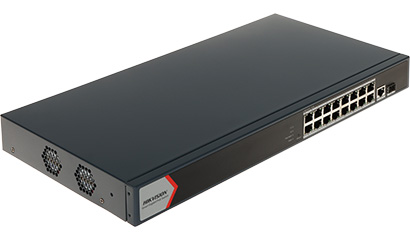
🔌 Key Specifications
-
Ports: 16 × Gigabit PoE RJ45 ports, 1 × Gigabit RJ45 uplink port, plus 1 × Gigabit fiber optical port Hikvisionsmarttech247.vnoncub2b.com
-
PoE Support: IEEE 802.3af (PoE) and IEEE 802.3at (PoE+), up to 30 W per port Hikvisionsmarttech247.vn
-
Power Budget: Either ~130 W or ~230 W—some variants report 130 W total over all ports, others list 230 W. This may vary by region or firmware version—check your exact model label or datasheet Hikvision+1
-
Transmission: Supports long‑range PoE mode up to ~300 m (depending on device and cable quality) Hikvisionsmarttech247.vn
-
Switching Performance: Switching capacity ~56 Gbps, forwarding rate ~41.66 Mpps, internal cache ~4.1 Mbits, MAC table ~8 K entries Hikvisionsmarttech247.vn
-
Hardware: Metal chassis, ~2.7 – 2.9 kg, fits standard 1U rack, 6 kV surge protection on PoE ports Hikvisionesco.pk
⚙️ Smart Management Features
-
Port Isolation: Ability to group ports so they can’t communicate with each other but can with outside devices—improves network security Hikvisionaytech.pk
-
PoE Watchdog: Automatically restarts non-responsive cameras on supported ports Hikvisionaytech.pk
-
Link Aggregation: Static aggregation, up to 8 groups for load balancing or redundancy Hikvisionaytech.pk
-
Loop Prevention: Supports STP (802.1D) and RSTP (802.1w) to prevent loops in the network Hikvisionaytech.pk
-
802.1Q VLAN: Up to 32 VLANs (IDs 1–4094), trunk/access port modes Hikvisionaytech.pk
-
Extras: Supports LLDP discovery, DHCP client, cable fault detection, port mirroring, bandwidth/PoE power usage monitoring, remote firmware upgrade via Hik‑Partner Pro/Hik‑Central Hikvisionsmarttech247.vn
🔍 Use & Considerations
-
For PoE Cameras: Ideal for powering multiple IP cameras. With 16 PoE‑compliant ports up to 30 W each, maximum overall power depends on budget (130 W or 230 W). Under 130 W, powering all 16 at full (30 W) simultaneously isn’t feasible—you’d need a higher budget unit like the 230 W version or deploy dual switches. Hikvisionsmarttech247.vn
-
Long‑Range Use: Good for remote PoE cameras up to 300 m (in extend mode), though actual performance depends on cable quality and endpoint hardware Hikvisionsmarttech247.vn
-
User Feedback: Some users recommend separating high‑power (“Hi‑PoE”) cameras (e.g. 60 W) onto dedicated switches or injectors due to the limited power budget of typical switches like this Reddit.
📊 Summary Comparison
| Feature | Specification |
|---|---|
| Ports | 16 × Gig PoE + 1 × Gig uplink + 1 × SFP |
| PoE Standards | 802.3af / 802.3at |
| Max Port Power | 30 W per port |
| Total Power Budget | ~130 W (or possibly 230 W variant) |
| Long-Range Support | Up to 300 m |
| Switching Capacity | ~56 Gbps |
| Managed Features | VLAN, STP/RSTP, Watchdog, LLDP, LACP |
| Surge Protection | 6 kV |
✅ Buying or Setting It Up?
-
Ensure you verify whether your exact model SKU supports the 130 W or 230 W PoE budget—this affects how many devices you can power simultaneously.
-
If you plan to run 60 W Hi‑PoE cameras (e.g. DS‑2SE7C…), using a more capable switch or separate injector is worth considering—many Hikvision users echo this advice Reddit.
-
Follow recommended cabling: Cat5e or Cat6 UTP is typically sufficient for PoE and extended runs; shielded cables (STP) aren’t always necessary and could complicate setup Reddit+1.
❓ Need More Help?
Let me know if you need assistance with:
-
Configuring VLANs or LACP.
-
Calculating whether the power budget supports your camera set.
-
Firmware versions or management via Hik‑Partner Pro/iVMS.
-
Finding comparable higher PoE-budget switches from other brands (e.g., Zyxel, Cisco) as mentioned by users.
Happy to dive deeper into any aspect!


Reviews
There are no reviews yet.